
Quick Summary
- ACME automates SSL certificates — no more manual CSR generation, validation, or installation
- Supports all major web servers — Apache, NGINX, IIS, Caddy, LiteSpeed
- SSL lifespans are shrinking — from 398 days (2020) to just 47 days by 2029
- Free tools available — Certbot, acme.sh, and others are completely free
- Free cheat sheet PDF included at the bottom of this article

How much time did you spend on SSL certificate management last year? Tracking expiration dates. Generating CSRs. Validating domains. Installing renewals. Hoping you didn't miss one and wake up to angry emails about browser security warnings.
These tasks eat up hours every year. Boring, repetitive hours. And now that SSL lifespans are shrinking, you're looking at even more of them. But here's the thing: you don't have to spend so much time on SSL certificates. The ACME protocol can handle it all automatically.
What is ACME and Why Should You Care?
ACME (Automatic Certificate Management Environment) is an open protocol defined in RFC 8555 that automates the entire SSL/TLS certificate lifecycle. It handles domain validation, certificate issuance, installation, and renewal — all without human intervention.
Think of ACME as a conversation between your server and a Certificate Authority (CA). Your server proves it controls a domain, the CA issues a certificate, and your ACME client installs it. When the certificate approaches expiration, the process repeats automatically.
Key Benefits of ACME Automation
- Zero-touch renewals: Certificates renew automatically 30 days before expiration
- Free certificates: Let's Encrypt and other ACME CAs offer free DV certificates
- Industry standard: Supported by all major web servers and hosting providers
- Eliminates human error: No more forgotten renewals or misconfigured certificates
- Works at scale: Manage hundreds of domains with a single client
Here's What's Changing: SSL Validity Is Shrinking
The CA/Browser Forum has approved a roadmap to dramatically reduce SSL certificate lifespans. This is the single biggest reason why ACME automation has gone from "nice to have" to absolutely essential.
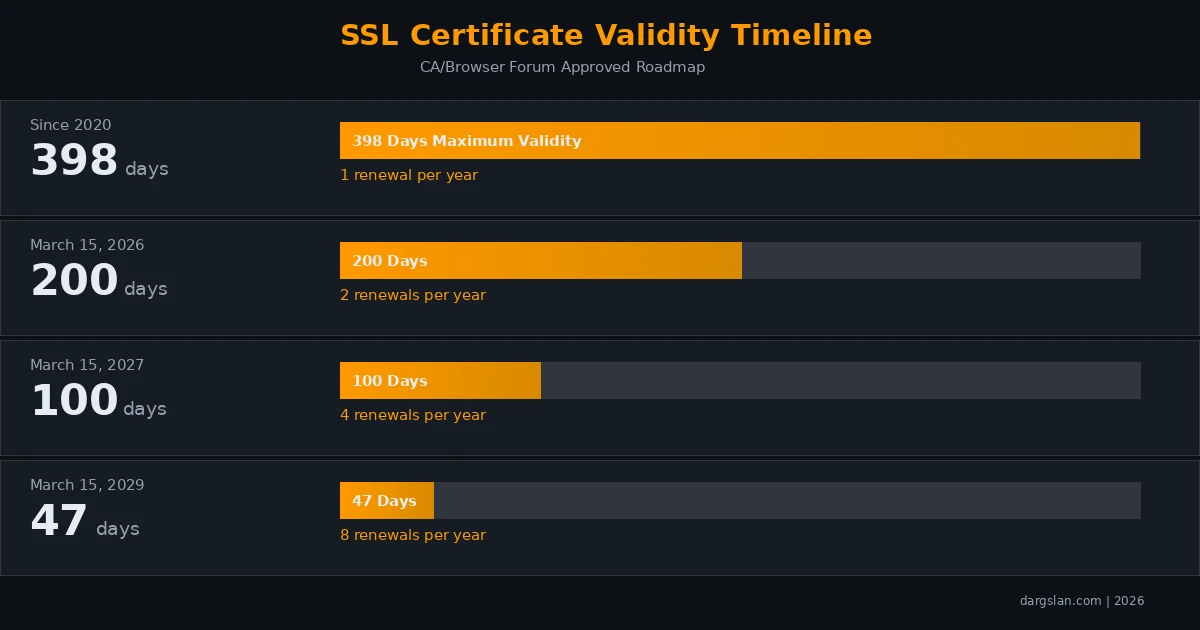
| Date | Max Validity | Renewals/Year | Impact |
|---|---|---|---|
| Since 2020 | 398 days | 1x | Annual renewal — manageable manually |
| March 15, 2026 | 200 days | 2x | Semi-annual — manual still possible |
| March 15, 2027 | 100 days | 4x | Quarterly — manual becomes painful |
| March 15, 2029 | 47 days | 8x | ACME automation is essential |
For an organization managing 50 domains, the shift to 47-day certificates means 400 manual renewal operations per year. That's more than one every single business day. Without automation, this is unsustainable.
How ACME Works: The 4-Step Process
Understanding ACME's workflow helps you troubleshoot issues and choose the right configuration:
Step 1: Account Registration
Your ACME client creates an account with the Certificate Authority and generates a key pair for secure communication.
Step 2: Domain Validation (Challenge)
The CA needs proof that you control the domain. ACME supports three challenge types:
| Challenge | How It Works | Best For |
|---|---|---|
| HTTP-01 | Place a file at /.well-known/acme-challenge/ | Standard web servers with port 80 access |
| DNS-01 | Create a TXT record at _acme-challenge.domain.com | Wildcard certificates, no port 80 needed |
| TLS-ALPN-01 | Respond on port 443 with a special TLS extension | Port 80 blocked, no DNS API access |
Step 3: Certificate Issuance
Once validation succeeds, the CA issues the certificate. Your client downloads the certificate chain (cert + intermediate CA).
Step 4: Automatic Renewal
Your ACME client monitors certificates and renews them 30 days before expiration. A cron job or systemd timer triggers the renewal check.
Getting Started with Certbot (Most Popular ACME Client)
Certbot is the most widely used ACME client, developed by the EFF. It supports Apache and NGINX with automatic configuration.
Installation
# Ubuntu/Debian
sudo apt update && sudo apt install certbot

# With NGINX plugin
sudo apt install python3-certbot-nginx

# With Apache plugin
sudo apt install python3-certbot-apache

# CentOS/RHEL
sudo dnf install certbot python3-certbot-nginx
Obtain Your First Certificate
# NGINX — automatic configuration
sudo certbot --nginx -d example.com -d www.example.com

# Apache — automatic configuration
sudo certbot --apache -d example.com -d www.example.com

# Standalone mode (when no web server is running)
sudo certbot certonly --standalone -d example.com

# Webroot mode (web server running, no plugin needed)
sudo certbot certonly --webroot -w /var/www/html -d example.com
Pro tip: Always use the --staging flag first when testing. Let's Encrypt has strict rate limits (50 certificates per domain per week), and the staging environment lets you test without hitting those limits.
# Test with staging first
sudo certbot --nginx --staging -d example.com

# When satisfied, run without --staging for production cert
sudo certbot --nginx -d example.com
Wildcard Certificates
# Wildcard requires DNS-01 challenge
sudo certbot certonly --manual --preferred-challenges dns \
  -d '*.example.com' -d example.com

# With Cloudflare DNS plugin (fully automated)
sudo apt install python3-certbot-dns-cloudflare
sudo certbot certonly --dns-cloudflare \
  --dns-cloudflare-credentials /etc/letsencrypt/cloudflare.ini \
  -d '*.example.com' -d example.com
Automatic Renewal Setup
# Certbot auto-renewal is usually installed automatically
# Verify the timer is active:
sudo systemctl status certbot.timer

# Test renewal (always do a dry run first)
sudo certbot renew --dry-run

# If timer is not active, enable it:
sudo systemctl enable certbot.timer
sudo systemctl start certbot.timer

# Or set up a cron job manually:
echo "0 0,12 * * * root certbot renew --quiet" | sudo tee /etc/cron.d/certbot
acme.sh: The Lightweight Alternative
acme.sh is a pure shell script ACME client — no dependencies, no root required, and incredibly flexible. It supports over 150 DNS providers for automated DNS-01 challenges.
# Install
curl https://get.acme.sh | sh -s email=admin@example.com

# Set default CA
~/.acme.sh/acme.sh --set-default-ca --server letsencrypt

# Issue certificate with NGINX
~/.acme.sh/acme.sh --issue -d example.com --nginx

# Install to NGINX
~/.acme.sh/acme.sh --install-cert -d example.com \
  --key-file /etc/nginx/ssl/example.com.key \
  --fullchain-file /etc/nginx/ssl/example.com.pem \
  --reloadcmd "systemctl reload nginx"

# Automated Cloudflare DNS wildcard
export CF_Key="your_api_key"
export CF_Email="your@email.com"
~/.acme.sh/acme.sh --issue -d '*.example.com' --dns dns_cf
ACME for Windows (IIS)
Windows administrators can use win-acme (WACS) — the most popular ACME client for IIS:
# Download win-acme from GitHub releases
# Extract to C:\win-acme

# Interactive mode (guided setup)
.\wacs.exe

# Command-line mode
.\wacs.exe --target iis --siteid 1 \
  --installation iis --certificatestore My \
  --emailaddress admin@example.com --accepttos
NGINX SSL Best Practices Configuration
server {
    listen 443 ssl http2;
    server_name example.com www.example.com;

    ssl_certificate /etc/letsencrypt/live/example.com/fullchain.pem;
    ssl_certificate_key /etc/letsencrypt/live/example.com/privkey.pem;

    # Modern TLS configuration
    ssl_protocols TLSv1.2 TLSv1.3;
    ssl_ciphers ECDHE-ECDSA-AES128-GCM-SHA256:ECDHE-RSA-AES128-GCM-SHA256:ECDHE-ECDSA-AES256-GCM-SHA384:ECDHE-RSA-AES256-GCM-SHA384;
    ssl_prefer_server_ciphers off;

    # OCSP Stapling
    ssl_stapling on;
    ssl_stapling_verify on;

    # HSTS (2 years)
    add_header Strict-Transport-Security "max-age=63072000; includeSubDomains; preload" always;

    # Security headers
    add_header X-Content-Type-Options "nosniff" always;
    add_header X-Frame-Options "SAMEORIGIN" always;
}

# HTTP to HTTPS redirect
server {
    listen 80;
    server_name example.com www.example.com;
    return 301 https://$server_name$request_uri;
}
ACME at Enterprise Scale
For organizations managing certificates at scale, consider these strategies:
- Centralized management: Use a certificate manager that aggregates all ACME certificates across your infrastructure
- DNS automation: Use DNS-01 challenges with provider APIs (Cloudflare, AWS Route 53, Google Cloud DNS) for fully hands-off automation
- Monitoring: Set up alerts for certificate expiration, renewal failures, and configuration changes
- Multi-CA strategy: Configure backup CAs (ZeroSSL, Buypass) in case your primary CA has outages
- Certificate transparency: Monitor CT logs for unauthorized certificate issuance for your domains
Quick Start Checklist
| Step | Action | Time |
|---|---|---|
| 1 | Install ACME client (Certbot/acme.sh) | 2 minutes |
| 2 | Run certificate issuance command | 1 minute |
| 3 | Verify HTTPS works in browser | 30 seconds |
| 4 | Confirm auto-renewal timer is active | 1 minute |
| 5 | Test renewal with --dry-run | 1 minute |
Total time: Under 6 minutes. That's all it takes to set up SSL automation that runs forever.
Download the Free ACME SSL Cheat Sheet
We've compiled all the commands, configurations, and troubleshooting tips into a professional dark-themed PDF cheat sheet. Print it, keep it on your desktop, or reference it during your next server setup.
Download the Free ACME SSL Automation Cheat Sheet PDF
Frequently Asked Questions
Is ACME the same as Let's Encrypt?
No. ACME is the protocol; Let's Encrypt is a Certificate Authority that uses ACME. Other CAs like ZeroSSL, Buypass, and Google Trust Services also support ACME. You can use the same ACME client (like Certbot) with different CAs.
Are ACME certificates secure enough for production?
Absolutely. ACME certificates use the same cryptographic standards as any other SSL certificate. The only difference is the issuance process is automated. Domain Validated (DV) certificates from ACME CAs are trusted by all modern browsers and operating systems.
Can ACME handle wildcard certificates?
Yes, but wildcard certificates require DNS-01 validation. This means your DNS provider must support API access, or you need to add TXT records manually. Tools like Certbot with DNS plugins (Cloudflare, Route 53, etc.) can fully automate wildcard certificate management.
What happens if automatic renewal fails?
ACME clients typically retry renewal multiple times before expiration. Certbot attempts renewal 30 days before expiry and retries regularly. If all attempts fail, you should receive an email warning (if configured). Always test with certbot renew --dry-run after initial setup.
Does ACME work behind a load balancer or CDN?
Yes. Use DNS-01 challenges for servers behind load balancers, CDNs, or firewalls that don't expose port 80 directly. Alternatively, configure your load balancer to forward ACME challenge requests to a designated validation server.
How do I switch from manual SSL to ACME automation?
Install an ACME client, run the certificate issuance command for your domain, and verify it works. Your ACME client will replace your existing certificate and handle all future renewals. No downtime is required — the transition is seamless.
Related Resources
- AutoInstall SSL Complete Guide — The easiest SSL automation solution
- ACME vs AutoInstall SSL Comparison — Which automation approach is right for you?
- ACME SSL Cheat Sheet PDF — Quick reference for all ACME commands



