
Quick Summary
- 3-step setup — install, configure, done. SSL handles itself from that point
- Works with all major servers — Apache, NGINX, IIS, Caddy, LiteSpeed
- Automatic everything — validation, installation, renewal, and monitoring
- Instant alerts if anything goes wrong — certificate issues, renewal problems
- Free cheat sheet PDF included at the bottom of this article
Let's be honest: most IT professionals don't enjoy managing SSL certificates. It's one of those tasks that feels important enough that you can't ignore it, but tedious enough that you'd rather be doing anything else. Generating CSRs, waiting for validation, downloading certificate files, installing them correctly, configuring cipher suites, and then doing it all over again when the certificate expires.
AutoInstall SSL eliminates all of that. Run one command, complete a brief setup, and your SSL certificate is live. From that point forward, AutoInstall SSL handles renewals, monitoring, and alerts automatically.
What is AutoInstall SSL?
AutoInstall SSL is a commercial SSL certificate automation tool designed to make SSL management as simple as possible. Unlike open-source ACME clients that require you to understand certificate protocols, challenge types, and web server configuration, AutoInstall SSL abstracts all of that complexity away.
Once installed, it:
- Generates and submits the Certificate Signing Request (CSR)
- Completes domain validation automatically
- Downloads and installs the certificate on your web server
- Configures optimal SSL settings
- Monitors certificate health continuously
- Renews certificates before they expire
- Alerts you immediately if anything goes wrong
Why SSL Automation Matters More Than Ever
SSL certificate lifespans are getting shorter. Much shorter. The CA/Browser Forum has approved a roadmap that will reduce maximum certificate validity from 398 days to just 47 days by March 2029.
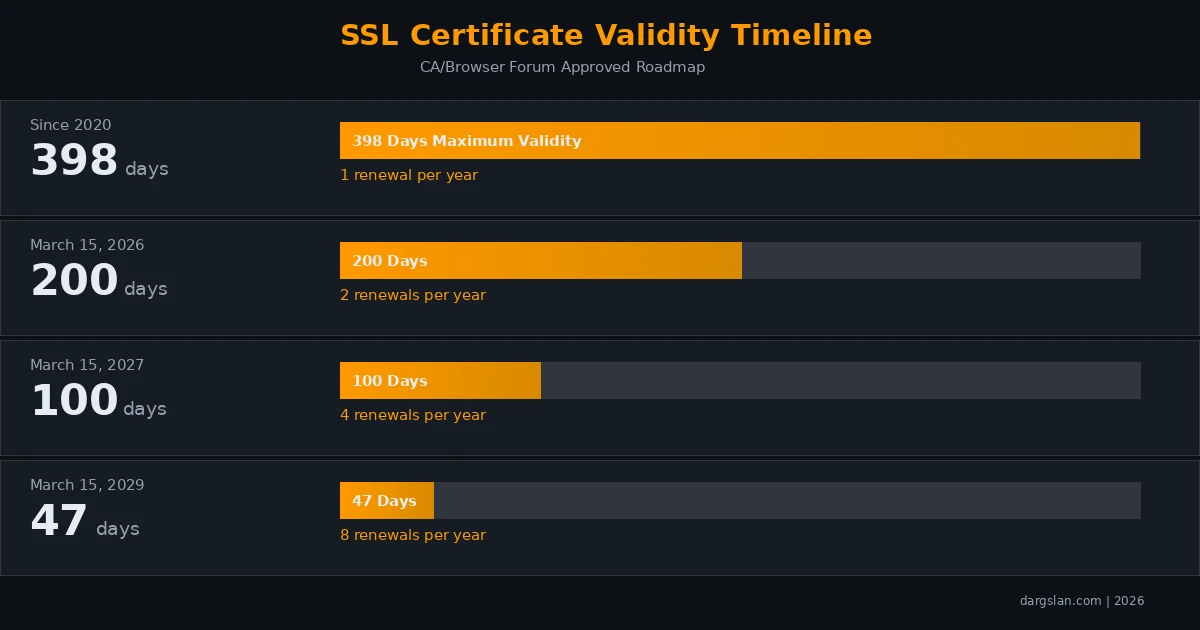
For an organization managing 50 domains, 47-day certificates mean approximately 400 renewal operations per year. That's more than one per business day. Manual management simply won't scale.
Getting Started: 3 Simple Steps
Step 1: Purchase Your Certificate
Purchase an AutoInstall SSL certificate from your SSL provider. You'll receive:
- An API key for authentication
- An installation command (pre-configured with your credentials)
- Access to the management dashboard
Step 2: Run the Installation Command
Linux (Apache, NGINX, LiteSpeed):
# One-line installation
curl -sSL https://autoinstallssl.com/install | bash -s -- \
  --api-key YOUR_API_KEY \
  --domain example.com \
  --webserver auto
Windows (IIS):
# PowerShell installation
Set-ExecutionPolicy RemoteSigned -Scope CurrentUser
iwr https://autoinstallssl.com/install.ps1 | iex
Install-AutoSSL -ApiKey YOUR_API_KEY -Domain example.com
AutoInstall SSL automatically detects your web server type, generates the CSR, validates your domain, installs the certificate, and configures your server. The entire process typically takes under 3 minutes.
Step 3: You're Done
Seriously. That's it. Visit your website and you'll see the padlock icon. Your certificate is installed, configured, and AutoInstall SSL is now monitoring it for renewal.
# Verify your installation
autossl status example.com

# Expected output:
# Domain: example.com
# Status: Active
# Issuer: DigiCert / Sectigo / etc.
# Valid Until: [date]
# Auto-Renewal: Enabled
# Next Renewal: [date - 30 days before expiry]
Supported Web Servers
| Web Server | Auto-Detection | Auto-Configuration | Platform |
|---|---|---|---|
| Apache | Yes | Full | Linux |
| NGINX | Yes | Full | Linux |
| LiteSpeed | Yes | Full | Linux |
| IIS | Yes | Full | Windows |
| Caddy | Partial | Partial | Cross-platform |
Managing Your Certificates
View All Managed Certificates
# List all certificates
autossl list

# Output example:
# DOMAIN              STATUS    EXPIRES       AUTO-RENEW
# example.com         Active    2026-09-15    Yes
# shop.example.com    Active    2026-09-15    Yes
# blog.example.com    Active    2026-08-20    Yes
Multi-Domain Certificates
# Add multiple domains to one certificate (SAN)
autossl install --api-key YOUR_KEY \
  --domain example.com \
  --domain www.example.com \
  --domain shop.example.com \
  --domain blog.example.com
Wildcard Certificates
# Wildcard requires DNS validation
autossl install --api-key YOUR_KEY \
  --domain '*.example.com' \
  --validation dns
Force Renewal
# Force immediate renewal (e.g., after key compromise)
autossl renew example.com --force

# Reinstall after server migration
autossl reinstall example.com
Monitoring and Alerts
AutoInstall SSL doesn't just install and forget. It continuously monitors your certificates and alerts you if anything needs attention:
# Configure alert email
autossl config set email admin@example.com

# Set alert threshold (default: 14 days before expiry)
autossl config set alert-days 14

# View recent activity
autossl logs --tail 20

# Test alert delivery
autossl test-alert
Alert triggers include:
- Certificate approaching expiration
- Renewal failure
- Certificate configuration change detected
- SSL grade drop (e.g., from A+ to B)
- New certificate issued for your domain (CT log monitoring)
AutoInstall SSL vs Manual Certificate Management
| Task | Manual | AutoInstall SSL |
|---|---|---|
| Generate CSR | 5-10 minutes | Automatic |
| Domain validation | 10-30 minutes | Automatic (under 1 min) |
| Certificate installation | 15-30 minutes | Automatic |
| Server configuration | 15-30 minutes | Automatic |
| Renewal tracking | Calendar reminders | Automatic monitoring |
| Renewal execution | 30-60 minutes | Automatic |
| Failure detection | User reports / monitoring | Instant alerts |
| Total per renewal | 1-2 hours | 0 minutes |
With 47-day certificates and 50 domains, manual management would consume 400-800 hours per year. AutoInstall SSL reduces that to zero.
Security Best Practices
AutoInstall SSL configures optimal security settings by default, but here are additional recommendations:
- Enable HSTS: Force HTTPS for all connections with the Strict-Transport-Security header
- Redirect HTTP to HTTPS: Set up a 301 redirect from port 80 to port 443
- Disable old protocols: Only allow TLS 1.2 and TLS 1.3
- Enable OCSP Stapling: Faster TLS handshakes and improved privacy
- Test your configuration: Use SSL Labs to verify your setup scores A+
- Monitor CT logs: Watch for unauthorized certificate issuance
Download the Free AutoInstall SSL Cheat Sheet
We've compiled all the commands, configurations, and troubleshooting tips into a professional dark-themed PDF cheat sheet. Perfect for keeping next to your terminal during server setup.
Download the Free AutoInstall SSL Cheat Sheet PDF
Frequently Asked Questions
Is AutoInstall SSL free?
No, AutoInstall SSL is a commercial product included with SSL certificates from supporting providers. The cost is typically included in your SSL certificate purchase. Unlike free ACME clients, AutoInstall SSL includes professional support, monitoring, and a management dashboard.
Can I use AutoInstall SSL with multiple servers?
Yes. AutoInstall SSL supports multi-server environments. You can install the same certificate on multiple servers, and renewal will synchronize across all of them. Enterprise plans typically include unlimited server installations.
What happens if AutoInstall SSL can't renew my certificate?
AutoInstall SSL will retry the renewal multiple times and send you immediate email alerts if renewal fails. The tool begins renewal attempts 30 days before expiration, giving you plenty of time to resolve any issues manually if needed.
Does AutoInstall SSL work with cPanel or Plesk?
Yes. AutoInstall SSL integrates with popular hosting control panels including cPanel, Plesk, and DirectAdmin. The installation process is similar — run the provided command and AutoInstall SSL handles the rest.
Can I switch from Certbot to AutoInstall SSL?
Yes. Install AutoInstall SSL alongside Certbot and it will detect and replace existing certificates. It's recommended to disable Certbot's auto-renewal timer after switching to avoid conflicts between the two tools.
Related Resources
- ACME SSL Automation Complete Guide — Open-source alternative with Certbot and acme.sh
- ACME vs AutoInstall SSL Comparison — Which approach is right for you?
- AutoInstall SSL Cheat Sheet PDF — Quick reference for all AutoInstall SSL commands



