
Quick Summary
- ACME — Open protocol, free clients (Certbot, acme.sh), full control, requires technical knowledge
- AutoInstall SSL — Commercial, one-command setup, zero configuration, includes monitoring
- Both automate renewals — critical with certificates shrinking to 47 days by 2029
- Choose ACME if you want free, open-source control and have technical expertise
- Choose AutoInstall SSL if you want simplicity and commercial support
SSL certificate automation is no longer optional. With certificate lifespans shrinking to 47 days by 2029, every organization needs an automated solution. The two most popular approaches are ACME (with clients like Certbot) and AutoInstall SSL. But which one is right for your infrastructure?
This comprehensive comparison breaks down both solutions across every dimension that matters: cost, ease of use, features, security, scalability, and support. By the end, you'll know exactly which approach fits your needs.
The SSL Crisis: Why You Need Automation Now
Before comparing solutions, let's understand why this decision is urgent:
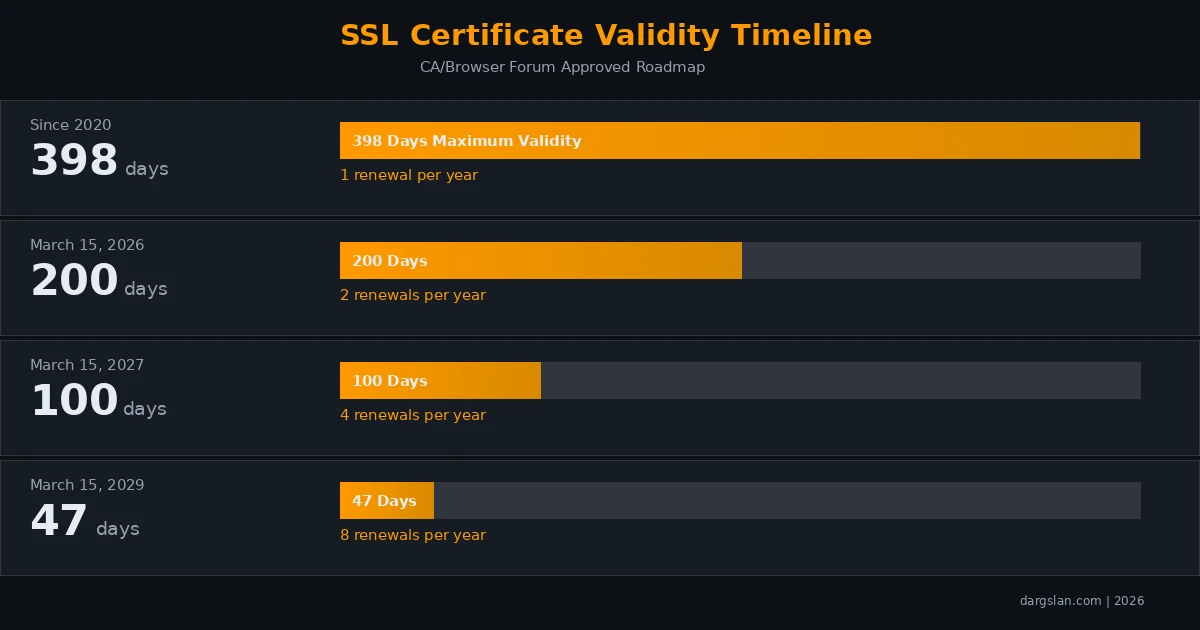
| Timeline | Max Validity | Renewals/Year (50 domains) | Annual Manual Hours |
|---|---|---|---|
| Since 2020 | 398 days | 50 | 50-100 hours |
| March 2026 | 200 days | 100 | 100-200 hours |
| March 2027 | 100 days | 200 | 200-400 hours |
| March 2029 | 47 days | 400 | 400-800 hours |
Without automation, managing SSL certificates for just 50 domains will consume 2-4 full-time work months per year by 2029. Both ACME and AutoInstall SSL eliminate this burden — but they do it very differently.
Head-to-Head Comparison
At a Glance
| Feature | ACME (Certbot/acme.sh) | AutoInstall SSL |
|---|---|---|
| Cost | Free (open-source) | Included with SSL purchase |
| Certificate Cost | Free (Let's Encrypt, ZeroSSL) | Varies by provider |
| Setup Complexity | Moderate (5-15 min) | Simple (under 3 min) |
| Technical Knowledge | Required | Minimal |
| Supported Servers | All (with plugins) | Apache, NGINX, IIS, LiteSpeed, Caddy |
| Wildcard Support | Yes (DNS-01 only) | Yes (DNS validation) |
| Auto-Renewal | Yes (cron/systemd) | Yes (built-in) |
| Monitoring | Manual setup required | Built-in with alerts |
| Support | Community forums | Commercial support |
| Certificate Types | DV only | DV, OV, EV |
| Protocol | Open standard (RFC 8555) | Proprietary |
| Multi-CA Support | Yes | Provider-specific |
Detailed Comparison
1. Cost Analysis
ACME wins on pure cost. The protocol is free, clients like Certbot and acme.sh are free, and CAs like Let's Encrypt provide free DV certificates. For budget-conscious teams, ACME is hard to beat.
AutoInstall SSL is included with commercial SSL certificate purchases. While this means a certificate cost, you also get OV and EV certificate options, commercial support, and built-in monitoring that you'd otherwise need to set up separately.
| Cost Component | ACME | AutoInstall SSL |
|---|---|---|
| Client software | Free | Included with certificate |
| DV certificate | Free (Let's Encrypt) | From $10/year |
| OV certificate | Not available | From $50/year |
| EV certificate | Not available | From $100/year |
| Monitoring tools | DIY or paid service | Included |
| Support | Community only | Included |
2. Ease of Setup
AutoInstall SSL wins on simplicity. The entire setup is a single command:
# AutoInstall SSL — one command
curl -sSL https://autoinstallssl.com/install | bash -s -- \
  --api-key YOUR_KEY --domain example.com --webserver auto
ACME setup requires more decisions and knowledge:
# ACME (Certbot) — requires understanding of options
sudo apt install certbot python3-certbot-nginx
sudo certbot --nginx -d example.com -d www.example.com
sudo certbot renew --dry-run
sudo systemctl enable certbot.timer
While ACME with Certbot isn't difficult, it requires understanding challenge types, plugin selection, and renewal configuration. AutoInstall SSL handles all these decisions automatically.
3. Certificate Types
AutoInstall SSL wins if you need OV or EV certificates. ACME CAs like Let's Encrypt only issue Domain Validated (DV) certificates. If your organization requires Organization Validated (OV) or Extended Validation (EV) certificates — common in finance, healthcare, and government — AutoInstall SSL is the only automated option.
| Certificate Type | ACME | AutoInstall SSL | Use Case |
|---|---|---|---|
| Domain Validated (DV) | Yes (free) | Yes | Standard websites, APIs |
| Organization Validated (OV) | No | Yes | Business sites, apps |
| Extended Validation (EV) | No | Yes | Finance, healthcare, government |
| Wildcard | Yes (DNS-01) | Yes | Multiple subdomains |
| Multi-domain (SAN) | Yes | Yes | Multiple domains on one cert |
4. Monitoring and Alerting
AutoInstall SSL wins on built-in monitoring. It includes continuous certificate monitoring and instant alerts for expiration, renewal failures, and configuration issues — all without additional setup.
With ACME, monitoring is your responsibility. You'll need to set up external monitoring tools like:
- UptimeRobot or Uptime Kuma for SSL expiry monitoring
- Custom scripts checking certificate dates
- Prometheus + Grafana for enterprise-grade monitoring
5. Flexibility and Control
ACME wins on flexibility. As an open protocol, ACME gives you complete control:
- Choose your CA (Let's Encrypt, ZeroSSL, Buypass, Google Trust)
- Configure backup CAs for redundancy
- Customize challenge types and validation methods
- Integrate with CI/CD pipelines
- Use DNS API automation with 150+ DNS providers
- Run in Docker, Kubernetes, or any environment
AutoInstall SSL is more opinionated — it makes decisions for you, which is great for simplicity but limits customization.
6. Enterprise Scale
| Scale Factor | ACME | AutoInstall SSL |
|---|---|---|
| 100+ domains | Script with loops | Dashboard management |
| CI/CD integration | Native support | API available |
| Kubernetes | cert-manager | Limited |
| Multi-cloud | Excellent | Good |
| Centralized dashboard | Third-party tools | Built-in |
| Compliance reporting | Manual | Automated |
When to Choose ACME
Choose ACME (with Certbot or acme.sh) when:
- Budget is a primary concern (everything is free)
- You have technical expertise on your team
- You only need DV certificates
- You want full control over your certificate infrastructure
- You're running Kubernetes or containerized environments
- You want to use multiple Certificate Authorities
- You prefer open-source solutions
When to Choose AutoInstall SSL
Choose AutoInstall SSL when:
- Simplicity is your top priority
- You need OV or EV certificates
- You want built-in monitoring and alerting
- Your team lacks deep SSL/TLS expertise
- You need commercial support with SLAs
- You manage a moderate number of domains (5-100)
- You're using traditional hosting (cPanel, Plesk, DirectAdmin)
The Hybrid Approach
Many organizations use both solutions strategically:
- ACME for development and staging: Free DV certificates for non-production environments
- AutoInstall SSL for production: OV/EV certificates with monitoring for customer-facing sites
- ACME for internal services: APIs, microservices, admin panels
- AutoInstall SSL for compliance: Regulated environments requiring OV/EV
Decision Flowchart
| Question | If Yes | If No |
|---|---|---|
| Do you need OV/EV certificates? | AutoInstall SSL | Continue |
| Is cost the primary factor? | ACME | Continue |
| Do you have Linux sysadmin skills? | Either works | AutoInstall SSL |
| Do you need built-in monitoring? | AutoInstall SSL | Continue |
| Are you running Kubernetes? | ACME (cert-manager) | Continue |
| Do you want maximum control? | ACME | AutoInstall SSL |
The Bottom Line
Both ACME and AutoInstall SSL solve the same fundamental problem: automating SSL certificate management in an era of shrinking certificate lifespans. Neither is objectively better — they serve different needs.
ACME is the Swiss Army knife — free, flexible, and powerful, but requires technical knowledge to wield effectively.
AutoInstall SSL is the power drill — purpose-built, simple, and effective, but comes at a cost and with less flexibility.
The worst choice is no automation at all. With certificates moving to 47-day lifespans, manual management is heading toward extinction. Pick the tool that fits your team and budget, and implement it today.
Frequently Asked Questions
Can I use ACME and AutoInstall SSL on the same server?
It's not recommended. Running two certificate automation tools on the same server can create conflicts — both may try to manage certificates for the same domain, leading to renewal failures or configuration issues. Choose one solution per server.
Which solution is more secure?
Both produce equally secure certificates. The cryptographic strength depends on the certificate configuration (key size, algorithm), not the automation tool. Both ACME and AutoInstall SSL default to secure configurations with RSA 2048+ or ECDSA P-256 keys.
How do I migrate from one solution to the other?
Migration is straightforward: install the new tool, issue a new certificate for your domain, and disable the old tool's auto-renewal. There's no downtime — the new certificate replaces the old one seamlessly.
Do both solutions support the new 47-day certificate lifespans?
Yes. Both ACME and AutoInstall SSL are designed for short-lived certificates. ACME clients like Certbot already handle 90-day Let's Encrypt certificates, and the renewal logic adapts automatically to shorter lifespans. AutoInstall SSL has confirmed support for the upcoming validity changes.
What about managed SSL from cloud providers (AWS, Azure, GCP)?
Cloud-managed SSL (AWS Certificate Manager, Azure App Service, Google-managed certs) is another excellent option if you're fully committed to a single cloud provider. They handle everything automatically. However, they only work within their respective cloud platforms, making ACME and AutoInstall SSL better choices for multi-cloud or on-premise environments.
Related Resources
- ACME SSL Automation Complete Guide — Deep dive into ACME protocol and Certbot
- AutoInstall SSL Complete Guide — Everything about AutoInstall SSL
- ACME SSL Cheat Sheet PDF — Free quick reference
- AutoInstall SSL Cheat Sheet PDF — Free quick reference



