
If you've ever wondered how cloud providers like AWS, Google Cloud, and Azure run millions of virtual servers on physical hardware — the answer is hypervisors. A hypervisor is the foundational technology that makes modern cloud computing, server consolidation, and virtual desktop infrastructure possible.
📥 Free Hypervisor Fundamentals Guide
Download our comprehensive PDF covering hypervisor types, key concepts, and choosing the right platform.
Download Free PDF →Table of Contents
- What Exactly is a Hypervisor?
- How Does a Hypervisor Work?
- Type 1 vs Type 2 Hypervisors
- Type 1 Hypervisors: The Enterprise Workhorses
- Type 2 Hypervisors: Desktop Virtualization
- Hardware-Assisted Virtualization
- Benefits of Hypervisor Technology
- Real-World Use Cases
- How to Choose the Right Hypervisor
- The Future of Hypervisors
What Exactly is a Hypervisor?
A hypervisor (also called a Virtual Machine Monitor or VMM) is a software layer that sits between physical hardware and virtual machines. It creates an abstraction layer that allows multiple operating systems to run simultaneously on a single physical server, each believing it has exclusive access to the underlying hardware.
Think of a hypervisor as a traffic controller at an airport. Just as a controller manages multiple aircraft using the same runway, a hypervisor manages multiple virtual machines sharing the same physical CPU, memory, storage, and network resources — ensuring they don't interfere with each other.
Key Terminology
| Term | Definition |
|---|---|
| Host Machine | The physical server running the hypervisor |
| Guest Machine (VM) | A virtual machine running on top of the hypervisor |
| Virtual Machine (VM) | An isolated software environment that emulates a complete computer |
| vCPU | A virtual CPU assigned to a VM, mapped to physical CPU cores |
| Overcommitment | Allocating more virtual resources than physically available |
How Does a Hypervisor Work?
At its core, a hypervisor performs four critical functions:
- Resource Abstraction — It presents virtual hardware (CPU, RAM, disk, NIC) to each VM, hiding the physical hardware details
- Isolation — Each VM operates in its own isolated sandbox. A crash or security breach in one VM cannot affect others
- Resource Scheduling — The hypervisor schedules CPU time, memory access, and I/O operations among all running VMs
- Hardware Mediation — It intercepts and translates hardware access requests from VMs to the actual physical hardware
When a virtual machine tries to execute a privileged CPU instruction (like accessing memory or I/O ports), the hypervisor traps that instruction and either emulates it or passes it through to the hardware using hardware-assisted virtualization features (Intel VT-x or AMD-V).
Type 1 vs Type 2 Hypervisors
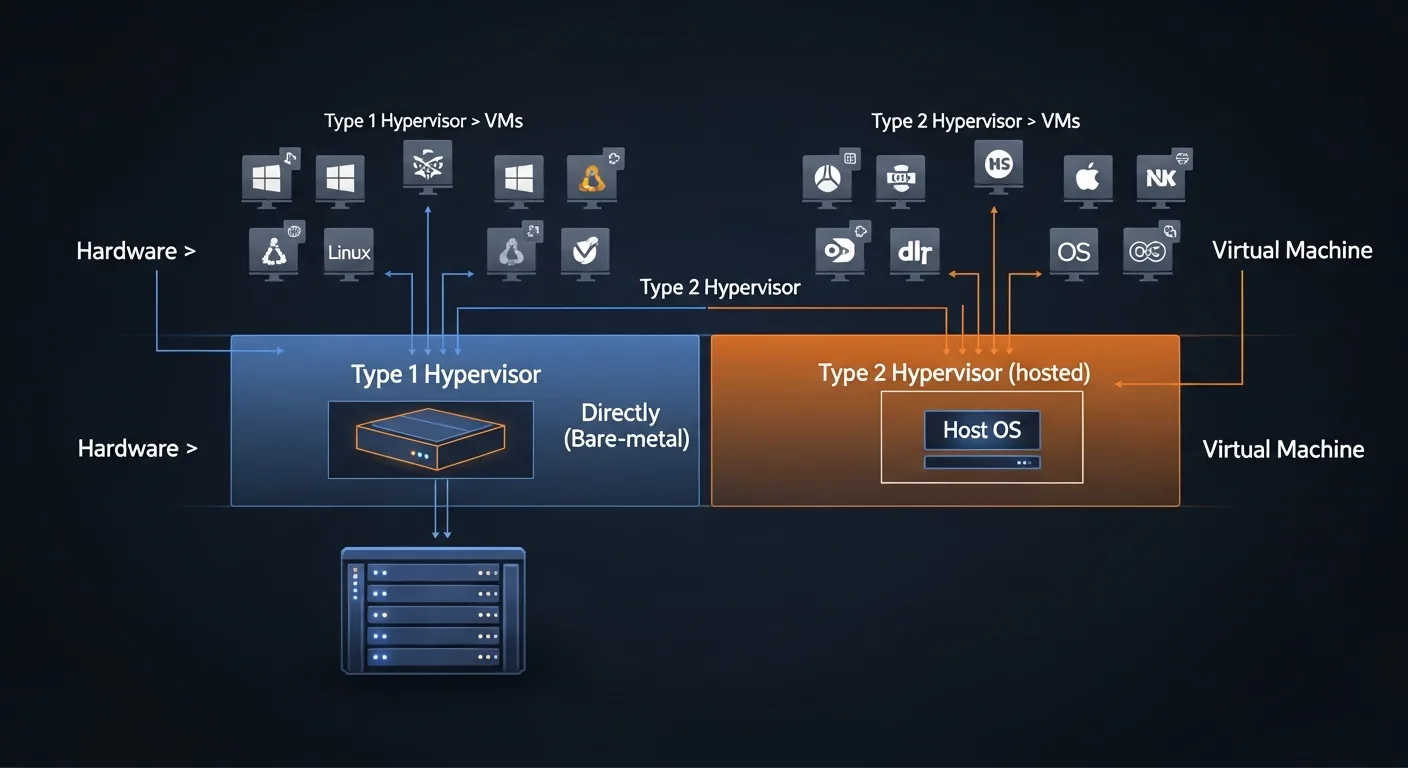
Hypervisors are classified into two main types based on how they interact with the underlying hardware:
Type 1: Bare-Metal Hypervisors
Type 1 hypervisors run directly on the physical hardware without a host operating system underneath. They are the first software loaded after the BIOS/UEFI, giving them direct access to hardware resources with minimal overhead.
| Aspect | Type 1 (Bare-Metal) | Type 2 (Hosted) |
|---|---|---|
| Installation | Directly on hardware | On top of existing OS |
| Performance | Near-native (1-5% overhead) | Higher overhead (5-15%) |
| Security | Smaller attack surface | Inherits host OS vulnerabilities |
| Use Case | Production servers, data centers | Development, testing, desktop |
| Examples | VMware ESXi, Hyper-V, KVM, Xen | VirtualBox, VMware Workstation |
| Management | Remote tools (SSH, Web UI, API) | Desktop application |
Type 1 Hypervisors: The Enterprise Workhorses
VMware ESXi / vSphere
The industry leader in enterprise virtualization. VMware vSphere provides the most mature ecosystem with features like vMotion (live migration), DRS (automated load balancing), and vSAN (software-defined storage). Used by 80%+ of Fortune 500 companies.
→ Read our complete VMware ESXi Guide
Microsoft Hyper-V
Built into Windows Server, Hyper-V is a compelling choice for Windows-centric environments. It offers strong Active Directory integration, PowerShell management, and is free with Windows Server licenses.
→ Read our complete Hyper-V Guide
KVM (Kernel-based Virtual Machine)
The open-source powerhouse built into the Linux kernel since 2007. KVM powers major cloud providers including Google Cloud, DigitalOcean, and Linode. Zero license cost, excellent performance, and massive community support.
Proxmox VE
An open-source platform that combines KVM virtual machines with LXC containers in a single web-based management interface. Ideal for home labs, SMBs, and budget-conscious organizations.
→ Read our complete Proxmox VE Guide
Xen / XCP-ng
Originally developed at Cambridge University, Xen was the first hypervisor used by AWS. XCP-ng is the modern open-source fork. Known for strong isolation through its unique Dom0/DomU architecture.
Type 2 Hypervisors: Desktop Virtualization
- Oracle VirtualBox — Free, open-source, cross-platform. Perfect for learning and development
- VMware Workstation Pro — Professional-grade desktop virtualization with advanced networking
- VMware Fusion — VMware Workstation equivalent for macOS
- Parallels Desktop — The best choice for running Windows on macOS (especially Apple Silicon)
- GNOME Boxes — Simple Linux desktop virtualization using libvirt/KVM
Hardware-Assisted Virtualization
Modern CPUs include built-in virtualization extensions that dramatically improve hypervisor performance:
| Technology | Intel | AMD | Purpose |
|---|---|---|---|
| CPU Virtualization | VT-x | AMD-V (SVM) | Efficient VM execution without binary translation |
| Memory Virtualization | EPT | NPT (RVI) | Hardware page table translation for VMs |
| I/O Virtualization | VT-d | AMD-Vi (IOMMU) | Direct device assignment (passthrough) |
| Network I/O | SR-IOV | Virtual NIC functions for direct VM access | |
To check if your CPU supports hardware virtualization on Linux:
# Intel VT-x
grep -c vmx /proc/cpuinfo

# AMD-V
grep -c svm /proc/cpuinfo

# Both (any support)
egrep -c '(vmx|svm)' /proc/cpuinfo
Benefits of Hypervisor Technology
- Server Consolidation — Run 10-50 VMs on a single physical server, reducing hardware costs by 60-80%
- Resource Efficiency — Overcommit CPU and memory to maximize hardware utilization (typical servers run at 10-15% utilization without virtualization)
- Isolation & Security — Each VM is completely isolated; a compromised VM cannot affect others
- Rapid Deployment — Provision new servers in minutes from templates instead of hours/days
- Disaster Recovery — Snapshots, replication, and live migration enable business continuity
- Testing & Development — Create isolated test environments without additional hardware
- Legacy Support — Run old operating systems (Windows XP, CentOS 6) in VMs when applications require them
- Energy Savings — Fewer physical servers means lower power and cooling costs
Real-World Use Cases
Cloud Computing
Every major cloud provider runs on hypervisors. AWS started with Xen, then moved to their custom Nitro hypervisor (KVM-based). Google Cloud uses KVM. Azure uses a customized Hyper-V. When you launch an EC2 instance or a Compute Engine VM, you're creating a virtual machine on a hypervisor.
Enterprise Data Centers
Companies consolidate hundreds of physical servers into clusters of hypervisor hosts. VMware vSphere dominates this space with features like High Availability (auto-restart VMs on healthy nodes), DRS (automated workload balancing), and vSAN (pooling local disks into shared storage).
Virtual Desktop Infrastructure (VDI)
Organizations deliver Windows desktops as virtual machines to thin clients. Users get consistent, managed desktop environments accessible from anywhere. Solutions include VMware Horizon, Citrix Virtual Apps, and Microsoft Azure Virtual Desktop.
DevOps & CI/CD
Development teams use hypervisors to create ephemeral test environments. Each CI/CD pipeline run can spin up fresh VMs, run tests, and destroy them — ensuring clean, reproducible builds.
Network Function Virtualization (NFV)
Telecom companies replace dedicated network appliances (routers, firewalls, load balancers) with VMs running software implementations. This enables flexible, scalable network infrastructure.
How to Choose the Right Hypervisor
| Scenario | Recommended | Why |
|---|---|---|
| Enterprise production | VMware vSphere | Most mature, best ecosystem and vendor support |
| Windows-centric org | Hyper-V | Free with Windows Server, AD integration |
| Linux servers | KVM | Native kernel module, zero cost, cloud-grade |
| Home lab / SMB | Proxmox VE | Free, excellent web UI, VMs + containers |
| Desktop / learning | VirtualBox | Free, easy, cross-platform |
| Budget-conscious | Proxmox or KVM | Full enterprise features at zero license cost |
For a detailed comparison of all major hypervisors with benchmarks and feature matrices, see our Complete Hypervisor Comparison Guide.
The Future of Hypervisors
While containers (Docker, Kubernetes) handle many workloads that previously required VMs, hypervisors remain essential for:
- Security-sensitive workloads — VMs provide stronger isolation than containers
- Windows workloads — Containers are Linux-native; Windows VMs still need hypervisors
- Legacy applications — Applications requiring full OS environments
- Multi-tenant environments — Cloud providers need VM-level isolation between customers
The trend is toward convergence: platforms like Proxmox VE and Kubernetes' KubeVirt allow running VMs and containers side by side, managed from a single platform. The future isn't "containers vs. VMs" — it's "containers AND VMs, orchestrated together."
📚 Explore Our Hypervisor Series
Deep-dive guides for every major hypervisor platform:
- VMware ESXi Complete Guide
- Microsoft Hyper-V Complete Guide
- KVM Linux Virtualization Guide
- Proxmox VE Complete Guide
- Xen Hypervisor Complete Guide
- Complete Hypervisor Comparison



