nftables is the modern Linux firewall framework that replaces iptables, ip6tables, arptables, and ebtables under a single, unified tool. If you manage Linux servers, containers, VPN gateways, or any network infrastructure, mastering nftables is essential in 2026. This comprehensive guide covers everything you need to know.

Why nftables Replaces iptables
nftables was introduced in Linux kernel 3.13 and is now the default firewall backend in Debian 10+, RHEL/AlmaLinux 9+, Ubuntu 20.04+, and all major distributions. Here is why the industry moved to nftables:
- Unified tool -- one
nftcommand replaces iptables, ip6tables, arptables, and ebtables - inet family -- handle IPv4 and IPv6 in a single table, eliminating rule duplication
- Native sets and maps -- O(1) hash-based lookups instead of linear rule scanning
- Atomic ruleset loading -- load entire config at once with zero downtime
- Cleaner syntax -- structured, readable rules instead of cryptic flags
- Better performance -- especially with large rulesets (1000+ rules)
Core Architecture
nftables uses a clean hierarchical model:
- Family:
ip(IPv4),ip6(IPv6),inet(both),arp,bridge,netdev - Table: A named container you create (no defaults exist)
- Chain: Holds rules, attached to Netfilter hooks (input, output, forward, prerouting, postrouting)
- Rule: Match expression + action, evaluated top-to-bottom
Unlike iptables, nftables starts with a blank slate -- you build your entire firewall architecture from scratch, giving you complete control.
Essential Commands
The nft CLI is your primary interface for managing the firewall:
# List the entire ruleset
nft list ruleset

# Create a table and chain
nft add table inet filter
nft add chain inet filter input \
    '{ type filter hook input priority 0; policy drop; }'

# Add rules
nft add rule inet filter input ct state established,related accept
nft add rule inet filter input iif lo accept
nft add rule inet filter input tcp dport { 22, 80, 443 } accept

# Save and load
nft list ruleset > /etc/nftables.conf
nft -f /etc/nftables.conf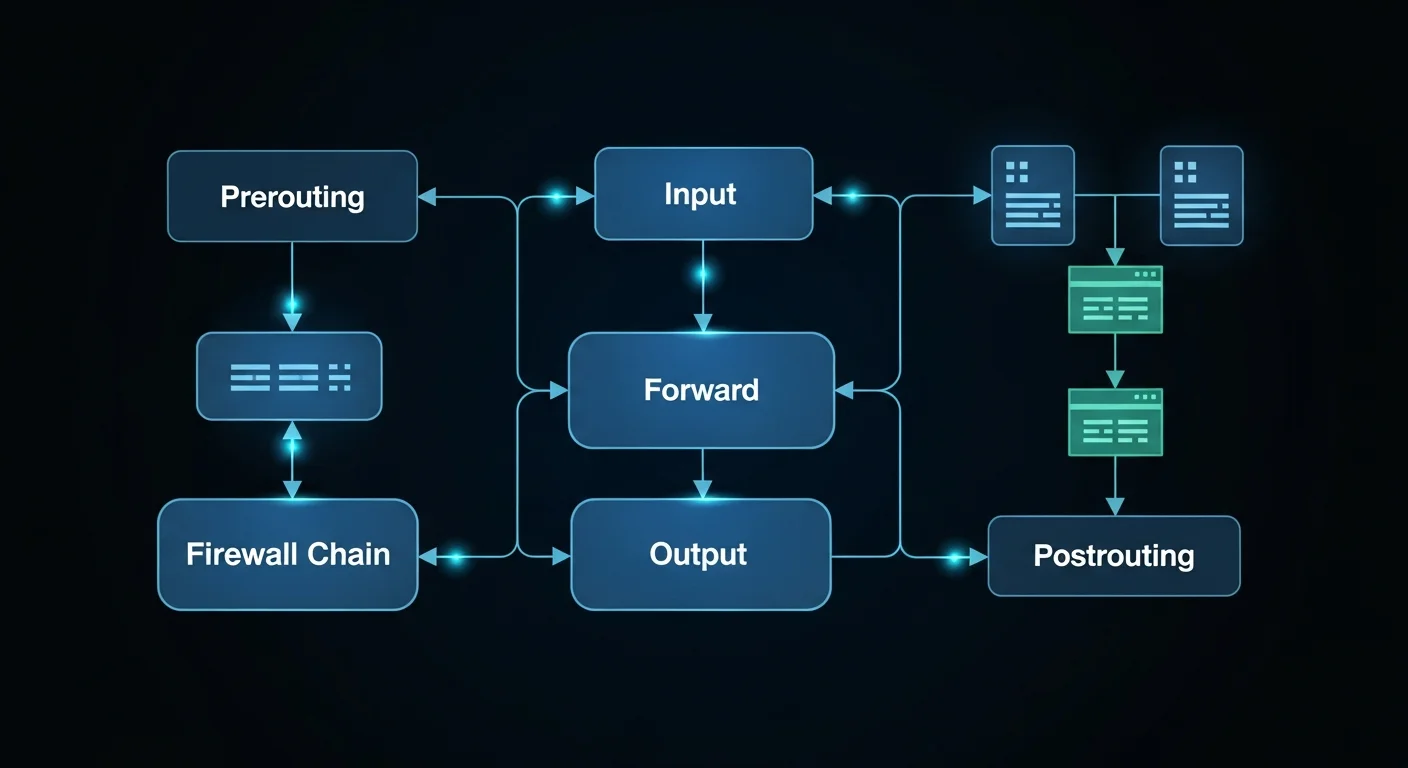
Named Sets and Maps
One of nftables most powerful features is native sets and maps. Instead of writing hundreds of rules for IP-based filtering, you define a set once and reference it:
# Define allowed admin IPs
nft add set inet filter admin_ips '{ type ipv4_addr; }'
nft add element inet filter admin_ips '{ 192.168.1.10, 10.0.0.5 }'

# Use in a rule (single rule replaces many)
nft add rule inet filter input ip saddr @admin_ips tcp dport 22 accept

# Auto-expiring blacklist for DDoS defense
nft add set inet filter blacklist '{ type ipv4_addr; flags timeout; timeout 1h; }'
nft add element inet filter blacklist '{ 203.0.113.50 timeout 30m }'
nft add rule inet filter input ip saddr @blacklist drop
Sets use hash-based O(1) lookups, so a set with 10,000 IPs performs identically to one with 10.
NAT: SNAT, DNAT, and Masquerading
nftables provides clean, powerful NAT capabilities:
# Masquerading (dynamic SNAT for VPN/NAT gateways)
table ip nat {
    chain postrouting {
        type nat hook postrouting priority srcnat;
        oifname "eth0" masquerade
    }
}

# Port forwarding (DNAT)
table ip nat {
    chain prerouting {
        type nat hook prerouting priority dstnat;
        tcp dport 8080 dnat to 192.168.1.100:80
        tcp dport 2222 dnat to 192.168.1.100:22
    }
}
Rate Limiting and DDoS Protection
Protect your servers from brute force and DDoS attacks with per-IP rate limiting:
# Per-IP SSH rate limiting
nft add rule inet filter input tcp dport 22 \
    meter ssh_meter '{ ip saddr limit rate 3/minute burst 5 }' accept

# Per-IP HTTP rate limiting
nft add rule inet filter input tcp dport 80 \
    meter http_meter '{ ip saddr limit rate 100/second burst 200 }' accept

# Log and drop brute force attempts
nft add rule inet filter input tcp dport 22 \
    meter ssh_block '{ ip saddr limit rate over 10/minute }' \
    log prefix "SSH-BRUTE: " drop
Docker and Container Integration
Docker traditionally uses iptables for container networking. When using nftables on the host, Docker uses the iptables-nft backend. Important security note: Docker port mappings (-p) bypass the INPUT chain, so you must use FORWARD chain rules to filter container traffic.
iptables to nftables Migration
Migrating from iptables is straightforward with the built-in translation tool:
# Translate single rules
iptables-translate -A INPUT -p tcp --dport 22 -j ACCEPT

# Translate entire ruleset
iptables-restore-translate -f iptables-backup.rules > nftables-new.conf
Production Hardened Firewall Template
Here is a complete, production-ready nftables configuration for a web server:
#!/usr/sbin/nft -f
flush ruleset

table inet server {
    set admin_ips { type ipv4_addr; elements = { 10.0.0.0/8 } }
    set blacklist { type ipv4_addr; flags timeout; }

    chain input {
        type filter hook input priority 0; policy drop;
        ct state established,related accept
        ct state invalid drop
        iif lo accept
        ip saddr @blacklist drop
        ip saddr @admin_ips tcp dport 22 accept
        tcp dport { 80, 443 } meter http_limit
            { ip saddr limit rate 50/second } accept
        ip protocol icmp limit rate 5/second accept
        ip6 nexthdr icmpv6 accept
        limit rate 5/minute log prefix "DROP: "
        counter drop
    }

    chain forward { type filter hook forward priority 0; policy drop; }
    chain output { type filter hook output priority 0; policy accept; }
}
Free PDF Cheat Sheet Download
We have created a comprehensive 20-page nftables cheat sheet covering all the topics in this guide: architecture, chains and hooks, filtering rules, sets and maps, NAT, rate limiting, logging, persistence, iptables migration, Docker integration, dual-stack firewall, production hardening, troubleshooting, and a quick reference page.
Download Free nftables Cheat Sheet (PDF)
Recommended Books for Deeper Learning
- Firewall Configuration: The Complete Guide -- comprehensive coverage of firewall design, zones, rules, and best practices
- Linux Firewall Configuration -- in-depth guide to Linux firewall management and security policies
- Linux Security Hardening -- essential server hardening techniques beyond the firewall
- Linux Networking Fundamentals -- master the networking foundations that nftables builds upon
- Network Security Fundamentals -- understand threats, protocols, and defense strategies
- Linux Networking Deep Dive -- advanced networking concepts for infrastructure professionals
Conclusion
nftables is the future of Linux firewalling, and it is already the present. Whether you are hardening a production web server, building a VPN gateway, managing Docker containers, or migrating from iptables, the tools and patterns in this guide will serve you well. The unified syntax, native sets, and atomic loading make nftables not just a replacement for iptables, but a significant upgrade.
Updated: March 2026. This guide reflects nftables as shipped in current Linux distributions including Debian 12, Ubuntu 24.04 LTS, RHEL 9, and AlmaLinux 9.