What Is Linux? Systems, Distributions and the Terminal
Explain in your own words what Linux, a distribution and a terminal are, and what you will be able to do at the end of this course.
None. You only need a computer you are allowed to install software on.
Why Linux?
Most of the internet runs on Linux: web servers, cloud machines, containers, routers, Android phones and the world's fastest supercomputers. If you want to work in IT operations, DevOps, cloud or security, you will meet a Linux terminal sooner or later - usually on day one.
The good news: you do not need to be a programmer to learn it. You need a safe place to practise and a steady routine. That is exactly what this course gives you.
Three words you need first
| Term | What it means |
|---|---|
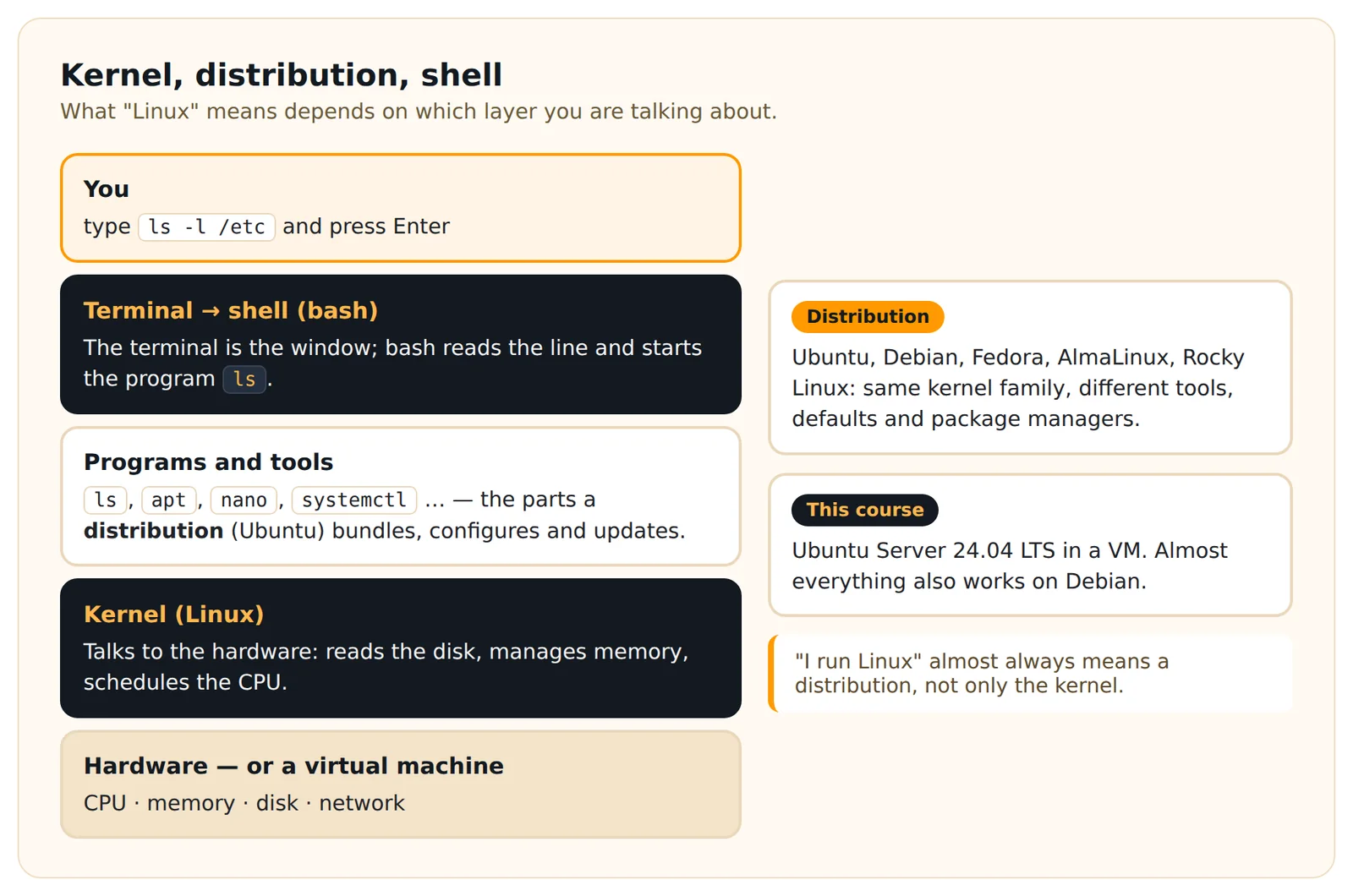
| Kernel | The core program that talks to the hardware: CPU, memory, disks, network. "Linux", strictly speaking, is the kernel. |
| Distribution | A complete operating system built around the Linux kernel: tools, package manager, default settings. Ubuntu, Debian, Fedora, AlmaLinux and Rocky Linux are distributions. |
| Terminal / shell | A text window where you type commands. The terminal is the window; the shell (usually bash) is the program that reads and runs what you type. |
When people say "I run Linux", they almost always mean a distribution.
Why we use Ubuntu 24.04 LTS
This course uses Ubuntu 24.04 LTS for every example. "LTS" means long-term support: it receives security updates for years, so the commands you learn stay valid. Almost everything you learn also works on Debian, and most of it on Fedora, AlmaLinux or Rocky Linux. Where a command is Ubuntu-specific, the lesson says so.
What a command looks like
You will spend most of this course typing short commands like this one:
ls -l /etclsis the command (list directory contents),-lis an option that changes how it works (long format),/etcis an argument - what the command works on.
You do not need to run it yet. In Lesson 4 we take this apart properly.
How this course works
- 100 lessons, at your own pace. One lesson a day is a good rhythm, but nothing locks or resets if you skip a day.
- Every lesson has one goal, a short explanation, tested examples, a practice task, a solution and a few quiz questions.
- You practise on your own virtual machine. Never on a work server, never on a machine with data you care about.
- Your progress is saved in your Dargslan account, so you can continue on any device.
What you will be able to do after 100 lessons
Work confidently in the terminal, manage files and permissions, install software, read logs and diagnose basic service and network problems, use SSH safely, write simple Bash scripts, and run a backup that you have actually tested by restoring it.
What this course does not promise: it is not a certification and 100 lessons do not make you a senior administrator. It gives you a solid, practical foundation to build on.
Practice task
Write down, in a text file or on paper, short answers to these three questions in your own words:
- What is the difference between the Linux kernel and a Linux distribution?
- What is the difference between a terminal and a shell?
- Name one place where Linux probably runs in your life already.
Then check which computer you will use for the course: is it Windows, macOS (Intel or Apple Silicon) or Linux, and roughly how much free disk space and memory does it have? You need this for Lesson 2.
Check your work
- Your kernel/distribution answer mentions that the kernel is the core and the distribution is the complete system built around it.
- You know your computer's operating system and whether it is an Intel/AMD or an Apple Silicon (ARM) Mac.
- You have at least 25 GB free disk space and 8 GB RAM in total (4 GB works, but slowly).
Common mistake: thinking "Ubuntu" and "Linux" are competitors. Ubuntu is a Linux distribution.
Show the solution - try the task first
- The kernel is the low-level core that manages hardware and runs programs. A distribution bundles the kernel with tools, a package manager, default configuration and often a desktop, so you get a usable operating system.
- The terminal is the window (or console) that shows text. The shell is the program inside it - usually bash - that interprets your commands.
- Examples: an Android phone, your home router, the web servers behind almost every website you use, a smart TV, cloud services.
In short
Linux is the kernel; distributions such as Ubuntu turn it into a complete system. You will control it through a shell in a terminal, by typing commands with options and arguments. In this course you practise on Ubuntu 24.04 LTS inside your own virtual machine, one lesson at a time.
Look it up later
Reference pages for what this lesson uses - handy when you need a reminder.
Commands
Cheat sheets
Quick quiz
3 questions · pass mark 80% · every answer is explained
Go deeper
Dargslan books that cover this topic in more depth.
Create a free account to track which lessons you have finished.
Log in or sign up