Snapshots, Updates and Safe Rollback
Update your practice machine, take snapshots before risky work, and restore a snapshot to undo a change.
Lesson 2 - a working Ubuntu Server 24.04 VM you can log in to.
A snapshot is an undo button for the whole machine
A snapshot saves the complete state of a VM's disk (and optionally its memory) at one moment. Restoring it puts the machine back exactly as it was - every file, setting and installed program.
That changes how you can learn: if a command in a later lesson breaks something, you do not need to repair it or reinstall. You restore the last snapshot and try again.
Where to find snapshots
| Software | Where |
|---|---|
| VirtualBox | Select the VM → the menu (☰) next to its name → Snapshots → Take |
| UTM | Snapshots are not in the main window in every version. Shut the VM down and duplicate it (right-click → Clone) as your restore point, or use the snapshot option if your UTM version shows one |
| Hyper-V | Right-click the VM → Checkpoint |
| virt-manager | Open the VM → View → Snapshots → + |
Taking a snapshot while the VM is shut down is the simplest and most reliable option. Give every snapshot a name that says what state it captures, for example 01-fresh-install or 02-updated.
Updating Ubuntu
Ubuntu installs software from package repositories with the apt tool (Module 5 explains it in depth). Updating is always two steps:
sudo apt update
sudo apt upgrade
sudo apt updatedownloads the current list of available package versions. It does not change any software yet.sudo apt upgradeinstalls the newer versions. It shows what it will do and asksDo you want to continue? [Y/n]- press Enter or Y.
If the kernel was updated, Ubuntu tells you a restart is required. You can check yourself:
ls /var/run/reboot-requiredIf the file exists, restart:
sudo rebootIf ls answers No such file or directory, no restart is needed.
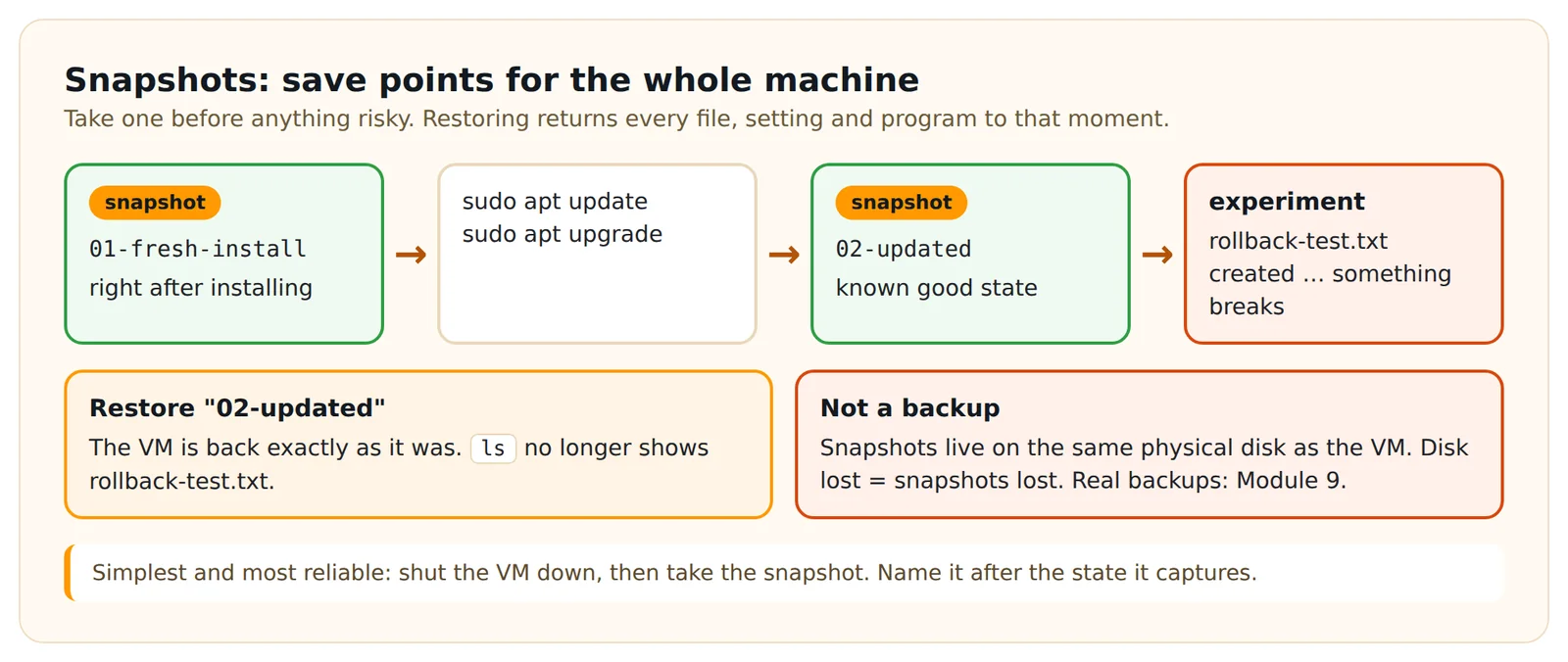
Trying a rollback
Let's prove the undo button works. Create a file in your home directory:
echo "this file should disappear" > rollback-test.txt
ls
echo prints text, and > writes that text into a file (Module 3 explains this). ls now shows rollback-test.txt.
Shut down, restore the snapshot you took before creating the file, start the VM and log in again. Run ls - the file is gone.
Practice task
- Shut the VM down and take a snapshot named
01-fresh-install. - Start it, log in and run
sudo apt updateandsudo apt upgrade. Reboot if/var/run/reboot-requiredexists. - Shut down and take a snapshot named
02-updated. - Start the VM, create
rollback-test.txtas shown above and check it exists. - Shut down, restore
02-updated, start the VM and confirm the file is gone.
Check your work
- Your snapshot list shows
01-fresh-installand02-updated. - After restoring
02-updated,lsno longer showsrollback-test.txt. - Running
sudo apt updateagain ends with a line such asAll packages are up to date.
Common mistakes:
- Restoring the snapshot but not starting the VM again from it (some tools ask whether to keep the current state - choose to restore).
- Running
apt upgradewithoutapt updatefirst - you get the versions from an old list. - Typing
apt updatewithoutsudo- you get a Permission denied error because only administrators may change software.
Show the solution - try the task first
anna@lab:~$ sudo apt update
[sudo] password for anna:
...
Reading package lists... Done
Building dependency tree... Done
5 packages can be upgraded. Run 'apt list --upgradable' to see them.
anna@lab:~$ sudo apt upgrade
...
Do you want to continue? [Y/n] y
...
anna@lab:~$ ls /var/run/reboot-required
ls: cannot access '/var/run/reboot-required': No such file or directory
The number of packages and the exact output will differ. After restoring 02-updated:
anna@lab:~$ ls
anna@lab:~$
An empty result means your home directory contains no visible files - the test file is gone.
In short
Snapshots let you undo anything on your practice machine, but they are not backups. Before updates or experiments, take a named snapshot. Update Ubuntu with sudo apt update followed by sudo apt upgrade, and reboot when /var/run/reboot-required exists.
Look it up later
Reference pages for what this lesson uses - handy when you need a reminder.
Key terms
Quick quiz
3 questions · pass mark 80% · every answer is explained
Go deeper
Dargslan books that cover this topic in more depth.
Create a free account to track which lessons you have finished.
Log in or sign up